May 12, 2026 · 10 min read
Bookkeeping Automation: 11 Real Workflows from CPAs Who Saved Hours per Week
Bookkeeping automation workflows from 11 CPAs and finance founders. Real tools, real numbers, real lessons on bank reconciliation, categorization, AI.
Bookkeeping automation is one of those phrases that sounds clear until you try to implement it. Do you mean bank reconciliation? Transaction categorization? Receipt management? Invoice processing? They're related, but the right tool, the right ROI, and the right starting point are different for each.
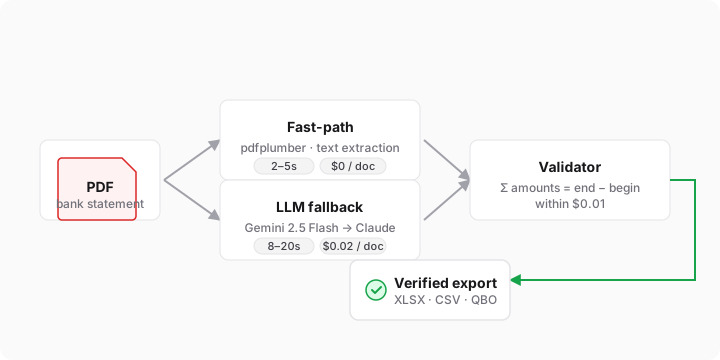
I spent two months building a bank statement parser before I really understood that. The trigger was specific: I'd tried asking ChatGPT to extract transactions from a Wells Fargo PDF and watched it confidently invent rows that didn't exist. I wrote that story up in Why ChatGPT lies about your bank statement. The short version is that direct-LLM extraction breaks in subtle ways on financial documents, and the only reliable defense is reconciling the extracted total against the statement's printed balance.
But spending two months inside that single problem made me realize how narrow it is. PDF parsing is maybe 5% of bookkeeping. The other 95% (reconciliation, categorization, receipt management, invoice processing) is what bookkeepers, CPAs, and finance leads have been automating for years. Most of what I read about it online was vendor copy.
So I went to ask them directly. I posted a question on Featured.com (a platform where publishers collect quotes from vetted experts) and got 33 responses back. Bookkeepers, CPAs, finance leads at small companies, a Citigroup SVP. Solo founders running Zapier-plus-Claude pipelines. Accounting firms on Xero and QuickBooks.
This is the 11 most actionable workflows from those 33 responses. Real tools. Real numbers. Real lessons on what to automate first, and what to leave alone. If you work with bank statements daily, you may also want our bookkeepers' workflow guide as a companion read.
Bank reconciliation automation: where the payoff is fastest
If you ask 30 bookkeepers what they hate most, "reconciling at month-end" comes up first or second. It's the textbook automation target: repetitive, rules-based, high-volume, and forgiving of small inaccuracies if you build a review queue around it. Almost every response in the survey mentioned reconciliation somewhere. Four people made it their #1 automation. Their workflows ranged from "30 vendor rules and a weekly review queue" to event-driven webhooks with fuzzy matching. The pattern across them is the same.
Sahil Agrawal, founder of Qubit Capital, lived this exact pain:
"Our finance lead used to spend most of Monday on bank reconciliation. Like, the whole morning. Then we turned on the auto-categorisation rules in our accounting tool and pointed the bank feed straight at it. Nothing fancy. Just rules for the 30 or so vendors we pay every month, a default category for anything under a small threshold, and a weekly review queue for the leftovers. The first month the rules were wrong about a quarter of the time and she had to correct them. The second month it was maybe 5%. By the third month Monday morning was free."
Sahil Agrawal, Founder, Qubit Capital
His parting advice flipped what most people assume: "Automate the boring repeating ones. The interesting ones are interesting precisely because a human should look at them. We still do."
At higher volume, the simple-rules approach hits its limit. CA Jaimin M., founder of NetBounce Global LLC, built a more structured workflow when his team's manual Excel reconciliation broke under scale. He layered fuzzy matching to handle the cases where vendors show up two or three different ways in the same statement, and built logic to detect split transactions (one-to-many and many-to-one). The result: reconciliation time dropped 70-80%, with match accuracy above 95%. His framing on the win: "The bigger change was where the team's attention went. Instead of reviewing every transaction, they now focus mainly on exceptions, which is where judgment actually matters."
CA Jaimin M., Founder & CEO, NetBounce Global LLC
Faiz Ahmed, founder of GpuPerHour, automated reconciliation between Stripe payments and QuickBooks invoices using a Zapier flow with one critical detail: a 2% tolerance band. Anything that doesn't match within tolerance gets routed to a Slack channel instead of auto-applied. He went from 8 hours/week to 45 minutes. Over a year, that's 350 hours redirected to growth. His advice: "Build in a manual review step for anything involving money. Full automation sounds appealing, but a misapplied payment creates more work than the automation saved."
Faiz Ahmed, Founder, GpuPerHour
Peter Signore, CEO of Dynaris, took the same approach but engineered it as an event-driven webhook system: every time a payment lands, a rule engine looks at amount + memo + customer ID, then either auto-applies it or routes to a "needs review" queue with the top three suggested matches already attached. His meta-advice is one of the sharper insights in the whole batch: "Instrument before you automate. Spend two weeks logging where the time actually goes: transaction count, minutes per item, error rate. You'll be surprised how often the 'obvious' target isn't the biggest drain."
Peter Signore, CEO, Dynaris
None of these reconciliation workflows start unless you can get the transactions out of the bank's PDF in the first place. That's the gap BankPDFtoXLS fills. Drop in a statement, get a verified XLSX, CSV, or QBO file that's been reconciled against the running balance before it ever hits your accounting tool. If QuickBooks is the destination, the PDF to QBO converter maps directly to QuickBooks Online without manual column mapping.
Automating transaction categorization in QuickBooks and Xero
Reconciliation tells you the numbers are right. Categorization tells you what they mean. It's the next chunk of work and it's where automation gains compound the fastest. Get categorization right and your monthly close becomes a 30-minute exception review instead of a four-hour data-cleaning session. Two responses in particular nailed how to set this up without creating bigger problems.
Akash Dey, Bookkeeping Support Manager at Book Tech, automates this with QuickBooks Bank Rules tied to vendor name and description patterns: "We used to manually review hundreds of transactions every month, mainly clients like ecommerce, retail store. They have tons of transactions, it's not always about categorization, we always had to think 'is this vendor COGS or Supplies', 'Is this one time or recurring'. Then to make our workflows more smooth and less time consuming we implemented: QuickBooks Bank Rules with Vendor Name and Description Pattern, mapped the vendors with Chart of Accounts, and developed a Monthly Closing Checklist. This auto categorizes almost 80-90% of our client's transactions. Saved 70-80% of time overall."
Akash Dey, Bookkeeping Support Manager, Book Tech
Akash's advice for anyone starting out is the trap most people fall into: "Don't jump into auto tools like Zapier in the beginning. You have to standardize your process, clean your foundation (standardize Chart of Accounts, clean vendor names, define rules), experiment, then maybe use auto tools."
For Xero users, the equivalent story comes from Erin Walls, Founder and Director at WallsMan Creative, an accounting firm for the creative industries: "The single biggest time-saver was definitely client expense categorisation and bank feed reconciliation. JAX (Xero's built-in AI) is now pretty good at this but we still need to manually check everything. It also learned along the way, as it was a bit rubbish at the beginning, but the AI quickly picked up our way of work and categorisation. What used to eat hours of manual back-and-forth each month, now takes a lot less."
Erin Walls, Founder & Director, WallsMan Creative
Her advice rhymes with Akash's: don't try to automate everything at once. "Pick one, and try to perfect that stage of your work with automation."
Bank rules and categorization handle the structured inputs. Receipts and vendor invoices are a different problem entirely. The inputs are unstructured, the formats vary, and the workflow has to bend around how messy real paperwork actually is.
Automating receipts and invoices with AI-in-the-loop
This is where AI tools start earning their keep. Rules-only systems fall apart on receipts because the same vendor shows up under five different names, amounts are often partial, and a meaningful number of receipts arrive as phone-camera photos at odd angles. Three responses, at three very different scales, picked this as their top automation. Each solved it a different way.
At the solo-founder scale, Jason Levin, CEO of Memelord, automated receipt classification with a Zapier flow that pipes receipts into Claude, gets a suggested GL category, and auto-pushes them into QuickBooks. Anything over $500 routes to human review instead. "Two hours a week back, instantly. The unlock was realizing AI is fine at the boring 80% if a human owns the high-stakes 20%."
Jason Levin, CEO and Founder, Memelord
Levin's parting advice doubles as a warning to founders who try to automate payroll before they've automated receipts: "Founders skip this and wire AI into payroll first, then panic when something breaks. Boring wins. Also: keep a human in the loop on anything tax-relevant. The IRS does not accept 'the bot did it' as a defense."
At the operations scale, Joe Spisak, CEO of Fulfill, was bleeding three hours every week reconciling carrier invoices manually: matching FedEx and UPS bills against shipping manifests, hunting for residential surcharges that shouldn't be there. He implemented Shipware's audit tool integrated with their WMS and QuickBooks. The output exceeded what he expected: "Our first month automated we recovered $4,800 versus our usual $2,000 because the software caught zone skipping errors I'd never have spotted manually."
Joe Spisak, CEO, Fulfill
Joe's heuristic for picking the first automation is one of the most quotable lines in the whole survey: "Start with the task that makes you want to throw your laptop. Not the most expensive problem. Not the most complex workflow. The one that drains your soul every single time you do it."
And finally, the quote that hit closest to home. Ibrahim Mohammed, CEO of IAM Accounting LLC, described automating exactly the workflow we built BankPDFtoXLS for: "One bookkeeping task I automated that saves my firm a bunch of time is turning messy bank statement PDFs into clean transaction data that actually isn't confusing when we use a Bank statement PDFs to XLS tool. Instead of someone on my team keying in every single line, or manually trying to add these into QuickBooks Online, we export it once, map it to our usual accounts, and then just review and adjust. It easily saves us hours per client each month."
Ibrahim Mohammed, CEO, IAM Accounting LLC
Ibrahim's workflow is the exact problem I set out to solve when I started building BankPDFtoXLS. He mentions testing multiple tools in the category, which is the right way to pick one, and a reminder that this segment is more crowded than it looks from the outside. If you want a deeper read on what makes statement-PDF parsers break, Five bank statement layouts that break naive parsers walks through specific failure modes.
Three universal principles from 33 finance pros
After reading all 33 responses, three principles came up repeatedly regardless of company size or industry. They're independent of the specific tool you pick, which is what makes them worth pulling out separately.
1. You cannot automate chaos
Girish Songirkar, Delivery Manager of Enterprise Software Engineering at Arionerp, watched an ERP three-way-match workflow (purchase orders, goods receipts, invoices) transform a finance team from data-entry operators into exception analysts. But his bigger lesson was upstream: "My best advice for someone who is beginning their automation process is to stop looking for a perfect software tool until you have standardised your input data. You cannot automate chaos. If your source data is not consistent or if you have created your own naming conventions that are disorganized, then automation will only exacerbate the mistakes you make. You must first clean your data structures, and then you can automate."
Girish Songirkar, Delivery Manager, Enterprise Software Engineering, Arionerp
2. Instrument before you automate
Peter Signore's principle from earlier deserves its own section. Most people pick their first automation by what feels most painful. Signore's data-driven counter: log where the time actually goes for two weeks first. The biggest drain is rarely the one that comes to mind.
3. Automate for trust, not just speed
From the enterprise scale, Archaana Pattabhii, Senior Vice President at Citigroup, has seen automation work and fail at a scale where a single mismatch can trigger a regulator. The same logic plays out at smaller scale in forensic accounting workflows. See how forensic accountants detect altered bank statements for the same trust-versus-speed tradeoff at the case-investigation level. Her framing is the most important one in the whole batch: "Automate for trust, not just speed. If your workflow saves time but no one believes the output, people will rebuild manual checks around it and you're back where you started. The best automations leave a clear trail: what happened, why it happened, and who needs to act."
Archaana Pattabhii, Senior Vice President, Citigroup
Small starts. Real measurement. Narrow scope. Transparent output. Across enterprise scale and solo-founder scale the playbook is identical.
Frequently asked questions about bookkeeping automation
What bookkeeping task should I automate first?
Pick the one that drains the most weekly hours, not the one that looks most technically exciting. In our survey of 33 finance pros the most common starting points were bank reconciliation and transaction categorization. Both are high-volume, rules-based, and forgiving of small inaccuracies if you build a review queue. Avoid starting with payroll or tax filing; those need judgment and break in expensive ways when an automation misfires.
Do I need QuickBooks for bookkeeping automation?
No. QuickBooks Online is the most commonly cited tool in the survey, but Xero, Wave, FreshBooks, and even spreadsheets-plus-scripts all show up. The key isn't the software. It's whether your chart of accounts, vendor names, and categorization rules are standardized before you turn automation on. As Girish Songirkar put it, "you cannot automate chaos." Clean structure first, then any modern bookkeeping platform works.
Can AI fully replace a bookkeeper?
Not yet, and probably not at small-business scale anytime soon. Every expert in the survey kept a human in the loop for at least one of: payments above a dollar threshold, tax-relevant entries, or exceptions flagged by the rules engine. AI handles the boring 80% of categorization and matching well; the remaining 20% needs judgment a model can't be trusted with. Jason Levin's framing was concise: "The IRS does not accept 'the bot did it' as a defense."
What's the difference between bank reconciliation and a bank feed?
A bank feed pulls transactions automatically from your bank into your accounting software. Bank reconciliation is the process of confirming those transactions match your actual records (same dates, amounts, and balances). Most modern accounting software automates the feed but still requires manual reconciliation at month-end. Tools like fuzzy matching, tolerance bands, and exception queues are how the experts in this survey cut reconciliation from hours to minutes.
How long does it take to set up bookkeeping automation?
The initial setup for one automation (rules, categories, integrations) typically takes 4-8 hours of focused work, plus a learning period where the rules are wrong 20-25% of the time. By the second or third month most respondents had rules at 90%+ accuracy. The longer-term payoff is real: respondents reported saving anywhere from 2 to 10 hours per week per automation. The compounding effect, and the freedom to focus on judgment work instead of data entry, is the actual prize.
Conclusion
What surprised me reading all 33 responses was the consistency of the lesson, not the variety of the tools. Different stacks (QuickBooks, Xero, Stripe, Zapier, Claude, custom scripts), same playbook every time. Pick one task that drains a real chunk of weekly hours. Build a small automation against measured numbers. Keep a human in the loop on anything that touches money. Expand only after the first one actually works.
Notice what nobody picked as their first automation: payroll, tax filing, audit prep. The judgment-heavy stuff. Everyone picked the boring repeating one. That tracks.
If your version of "the boring repeating one" right now is wrestling bank statement PDFs into Excel or QuickBooks, and Ibrahim's quote above suggests you're not alone, that's the workflow BankPDFtoXLS was built for. Every export gets reconciled against the statement's running balance before download. Drop in a PDF, get a verified file out.
Acknowledgments
Thanks to the eleven experts who shared their workflows for this piece: Sahil Agrawal (Qubit Capital), CA Jaimin M. (NetBounce Global), Faiz Ahmed (GpuPerHour), Peter Signore (Dynaris), Akash Dey (Book Tech), Erin Walls (WallsMan Creative), Jason Levin (Memelord), Joe Spisak (Fulfill), Ibrahim Mohammed (IAM Accounting), Girish Songirkar (Arionerp), and Archaana Pattabhii (Citigroup). The full survey of 33 responses was collected via Featured.com.
If you run a bookkeeping practice and want the operational specifics — pricing, batch limits, the QBO export flow your monthly close needs — see the bookkeepers page.