April 23, 2026 · 7 min read
Why ChatGPT will silently lie about your bank statement (and how to catch it)
Modern LLMs are excellent at looking right — and for bank-statement extraction, looking right is the failure mode you cannot catch by eye. Here's the 20 lines of Python that separate a plausible answer from a reconciled one.
Every few weeks someone posts a victory-lap screenshot — "uploaded my bank statement to ChatGPT, got a clean spreadsheet back in 30 seconds." The spreadsheet looks pristine. Every date is formatted consistently, every merchant name is title-cased, every amount has two decimal places. The poster is happy. The replies are happy. The feature is "solved."
It isn't. Those screenshots are the single most dangerous shape of LLM output for financial work, because the category of error in bank-statement extraction is almost never visible. It's not hallucinated merchants or wildly wrong dates you'd notice in review. It's one signed amount flipped on page 4 of a twenty-page statement, or a single transaction missing from a block that spanned a page break, or a Chase Zelle credit that the model confidently re-classified as a debit.You can't catch this by eye. You can only catch it by running the arithmetic the bank already published on the statement header — beginning balance + sum of all transactions must equal ending balance. This is twenty lines of Python. It is the thing that matters. Everyone who ships a bank-statement converter without it is shipping a plausible-looking lie.
The invariant
Every real bank statement obeys a conservation law. Whatever the bank prints as the ending balance is provably equal to the beginning balance plus the net of every transaction in the statement period. If you can extract the three numbers at the top of the page (beginning, ending, currency) and every row between them, you can check the whole extraction against a single subtraction:
abs(sum(amounts) - (ending - beginning)) < 0.01That's it. That's the whole check. If it holds, your extraction is self-consistent — not perfect (you might still have a typo in a merchant name), but mathematically sound. If it doesn't hold, you know something is wrong, and you can refuse to ship the file.General-purpose LLMs produce extractions that fail this check more often than you'd expect. We've measured first-pass reconciliation rates across Gemini 2.5 Flash, Claude Haiku 4.5, and Claude Sonnet 4.6 on a mix of real anonymised statements. Even the best models ship a first-pass extraction that reconciles about 85% of the time. The remaining 15% look just as clean as the passing ones. You would not catch them in review.
Why the models fail silently
Three failure modes account for almost every miss we see.
Sign conventions. A checking account treats withdrawals as negative; a credit-card statement treats purchases as positive (they increase the balance you owe). Every LLM trips on this at least some of the time, especially on cards with a "Payments and Credits" section that looks like checking-account deposits but sits inside a debt-accumulation layout. A model that infers "payment = money in = positive" instead of "payment = reduces debt = negative" silently double-flips your ledger.Page boundaries. Transactions routinely span page breaks. A merchant name on the last row of page 3, its date and amount on the first row of page 4. Every LLM we've tested has at least one failure mode here: dropping the row entirely, duplicating it on both pages, or worst of all, shifting the amount up a row so the correct date gets paired with the wrong number. The output looks perfectly reasonable. It just doesn't match the statement.
The off-by-penny. Every bank has at least one statement format where the printed running balance is rounded one way and the transaction amounts another — genuinely just a display rounding artefact, not a bank error. LLMs will often "correct" this by adjusting a random amount to make the math look right to them. The statement header reconciles. Your tax return, based on it, does not.
The 20 lines of Python
Here's the actual reconciliation check from our production pipeline, trimmed to the essential logic:
beginning = Decimal(result.beginning_balance)
ending = Decimal(result.ending_balance)
transaction_sum = sum(
  (Decimal(t.amount) for t in result.transactions),
  Decimal("0"),
)
expected = ending - beginning
diff = abs(transaction_sum - expected)
verified = diff < Decimal("0.01")
Everything else in our worker — the fast-path extractors, the LLM chain across three providers, the sign-flip retry, the dedicated Chase and Wells Fargo parsers — exists to produce rows the above check will pass. When it passes, we stamp a Verified badge and ship the XLSX. When it doesn't, we try one corrective LLM retry with the exact diff quoted back to the model, and if that fails too, we either fall back to the first-try result with an honest "unverified" flag or route the file to a human reviewer.That single check is the difference between "converter" and "audit-grade converter." It's not a clever algorithm or a proprietary model. It's arithmetic. The reason most tools don't have it is that implementing it forces you to be honest about the failures — and being honest about failures is much less exciting for a product screenshot than displaying a clean, plausible spreadsheet.
What you should actually do
If you're converting a statement for any use that could survive scrutiny — tax filing, loan application, divorce discovery, audit prep — run the reconciliation check yourself before you file anything. You don't need our tool to do it. Open the XLSX in any spreadsheet program, sum the amount column, and compare to (ending − beginning). If it matches within a penny, you're good. If it doesn't, the file is not usable as-is, and you need to figure out where the drift is before it costs you.
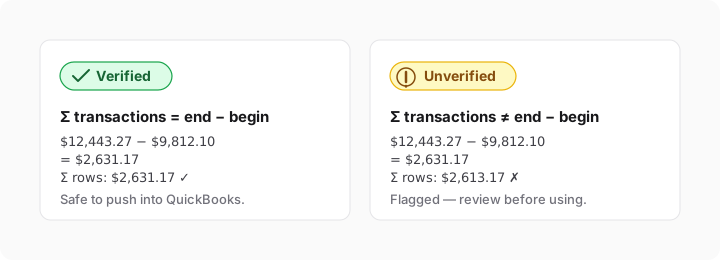
If you'd rather not run the check yourself every time — that's what we built. Every export from pdftoexcel runs the reconciliation as the final step of the pipeline. You see a green Verified badge on files where the math closes, or an honest red "doesn't reconcile, here's the gap" badge on files where it doesn't. We never ship a silently broken export. That single invariant is the only thing we think general-purpose LLMs cannot architecturally guarantee, and it's the only reason we exist.